Showing posts with label FamilySearch. Show all posts

Sunday, June 29, 2014

Passport Applications

If your ancestors ever traveled abroad, they may have applied for a passport. Before the 1940’s, passports were not required for international travel except during times of war (Civil War and WW I, particularly). However, many Americans applied for passports even when they were not required to do so. More than a half million passports were issued between 1810 and 1909.

Passport applications generally included the birth date and birth place of the applicant (with a sworn affidavit from someone who knew them personally), plus a physical description (height, weight, hair color, etc.). Later passports included photos. An entire family might be listed on a single passport. A woman might be listed on her husband’s passport. Missionaries who served abroad often applied for passports.


Fold3 and Ancestry.com both have indexed collections of US passports.  FamilySearch has unindexed passport collections from Portugal and Spain. To see a list of passport collections, type "passport" in the [Filter by collection name] box in the upper left corner.

To learn more about using Passport Applications in your family history research, stop by the Family History Center.


Sunday, June 8, 2014

Super simple scanning to the FamilySearch Family Tree!

Click on the FamilySearch logo on the printer to get started!
Have you got a photo or document that helps tell your family story?  Have you got a FamilySearch.org login and two minutes?

Bring that photo or document (or a stack of them) to the Williamsburg Family History Center, log into your FamilySearch.org account on the Lexmark printer (yes, THE PRINTER!), place your document face down on the glass and press [Scan]. 

That's it! Your irreplaceable item is scanned directly to your Memories tab on FamilySearch.org.  No cables to connect, scanner software to navigate, thumb drives to fumble, or file types to puzzle over. Just follow the prompts, and whatever you scan lands in your Memories collection on FamilySearch.

When you're finished scanning, log into FamilySearch on a computer (from home or while you're still at the FHC), tag those photos or documents, and attach them to people in the Family Tree.  For step-by-step instructions, see How to Scan Documents to Family Tree.

Preserve and share a precious memory this week. Stop by the Family History Center.

Sunday, June 1, 2014

Using Find-A-Record to clean up the FamilySearch Family Tree

If a lot of information about your ancestors has been added to the FamilySearch Family Tree by others or comes from merged records from other systems, you may have difficulty figuring out where you can begin.  Find-A-Record Research Assistant is a free tool that evaluates your FamilySearch Family Tree and provides a list of opportunities:

  • records that have missing information (birth or death facts)
  • records with missing relationships (parents or spouses)
  • information not supported by a record
  • information that is obviously incorrect, duplicate, or non-standard (meaning that the date or name of a place isn't in the correct format).  

Find-A-Record is a great tool whether you're a beginner or an experienced researcher.  To get started, go to findarecord.com and click on [Start]. Simply log in using your FamilySearch.org user name and password, then click on each Opportunity to see what you can do!

Sunday, May 25, 2014

Remembering our ancestors who died in the service of our nation


When Gen. John Logan gave orders for the decoration of soldiers' graves on that first Decoration Day in 1868, he said:
"We should guard their graves with sacred vigilance. ... Let pleasant paths invite the coming and going of reverent visitors and fond mourners. Let no neglect, no ravages of time, testify to the present or to the coming generations that we have forgotten as a people the cost of a free and undivided republic."  

To help ensure we don't forget, take time this Memorial Day to learn more about your ancestors who served in the military. FamilySearch.org has more than 100 collections of military records. Also try the National Archives' Access to Archival Databases (AAD).

Fold3, Ancestry.com and MyHeritage, all h ave military collections, as well.  Many "premium content" web sites offer free access to military records over the Memorial Day weekend.  

Sunday, May 18, 2014

Preparing a family name for the temple


Getting names ready for the temple? Make sure that you have collected enough information to uniquely identify the individual for whom you wish to provide sacred ordinances.  The best way to do that is to complete birth, marriage and death information in the Family Tree, including complete dates and places.  Attach several sources that confirm the accuracy of the information.  Sources can include official vital records, census records, cemetery or obituary transcriptions, military draft cards, ship manifests, etc.

Once you have as complete a record as possible, check for duplicate records. Then create the ordinance request with confidence that you are helping create the "book containing the records of our dead, which shall be worthy of all acceptation." (D&C 128:24)

For help merging duplicates, attaching sources, or creating an ordinance request, stop by the Family History Center!


Sunday, May 11, 2014

Honoring Mothers on Mothers Day by Finding Female Ancestors


Do you have a woman in your pedigree who is known only by her first name, or worse yet, as "Mrs. [husband's name]"?  Honor motherhood by getting to know that woman!  Look first to see if you can find record of her marriage, the best way to determine a woman's maiden name. Since you don't know her name, search for her husband's name, plus her first name (if you know it). If you find a record, look to see if she is listed as "Miss" or "Mrs".  You may find her marriage, but discover a prior married name. Keep looking!
Unnamed woman in FamilySearch Family Tree
If you don't know when and where the nameless woman married, start looking for a marriage in the place where the first child was born, a year or two before the birth.  Other records to check include the marriage licenses and death certificates of each of her children, even the children who are not your direct line ancestor. Sometimes you can learn her maiden name by noting the surname of a mother-in-law listed in the same household in a census record.  Be sure to attach each record you find to the FamilySearch Family Tree to create a permanent record of the woman's life.

For help finding your female ancestors, stop by the Family History Center!

Sunday, April 13, 2014

Getting Help with FamilySearch - 24x7 support


Do you have questions about the FamilySearch Family Tree?  Confused about merging duplicate records, or deleting incorrect relationships?  Have you forgotten your password? Call FamilySearch Support!  With the help of volunteers and church service missionaries all over the world, FamilySearch offers help 24-hours a day, 7 days a week, 365 days a year.  No matter the time of day or night, if you have a question, you can get an answer.
FamilySearch.org "Get Help" screen

When you call, the person who answers first will ask you a few brief questions in order to determine which team can best assist you. Some teams help with FamilySearch Family Tree. Others help new users set up an account or browser questions. Genealogical society volunteers might address research questions.  

Figure out where you're getting stuck and see if FamilySearch Support can help!
Call 866-406-1830. 

Just remember, 866 + (month and date church was founded) +  (year church was founded)

Sunday, March 30, 2014

MacFamily Tree for OS X


If you are a Mac user and have long wished for a program that would share information with the FamilySearch Family Tree, you are in luck!  MacFamily Tree 7.0 by Synium Software has attained full FamilySearch "Tree Share" status.  MacFamily Tree syncs to iCloud, so you can access your database from multiple OS X computers.  Their MobileFamilyTree app works with iPad and iPhone. To learn more, or to download a free trial version, go to syniumsoftware.com. 

Sunday, March 23, 2014

Making your email address "public" on FamilySearch.org

FamilySearch.org Settings detail
One major purpose of the FamilySearch Family Tree is to facilitation collaboration - working with people we may not even know to document the lives of our ancestors.  Anything you add or change in the tree is associated with your contact name so that we all know who made what changes.

Your contact name may (or may not) be recognizable to others, but if you haven't made your email address "public" in your FamilySearch user settings, no one can contact you through FamilySearch.

Take a moment today to ensure your email address is set to "public".  Log in to FamilySearch.org, then click on your name (upper right corner, just under "Get Help") and then click the down arrow.  Select [Settings] and scroll down to find your email address and other contact information.  Click in the box at the end of each line to mark that item "Public".

While you can opt to show your full name, home address, phone and email address, at a minimum you should make your email address public. For help updating your FamilySearch privacy and contact settings, stop by the Family History Center!

Sunday, February 9, 2014

Watch RootsTech 2014 Sessions Online

Watch sessions of last week's Global RootsTech Conference online for free! This is the world's largest family history and technology conference. It's for anyone from a beginner to an expert. So whether you are looking for tips and ideas, or a little extra motivation, check it out online at RootsTech.org.

Hear from internationally known bloggers Ree Drummond (Pioneer Woman) and Stephanie Nielson. See the Legal Genealogist, Judy Russell, assemble and dismantle her family tree in her fantastic lecture about purposely and accurately telling our family stories.  Learn "What's New and What's Next" in the FamilySearch Family Tree from FamilySearch's own Ron Tanner. 

If you're an iPad user, check out Lisa Louise Cook's excellent session, "Become an iPad Power User".  Interested in Going Paperless? Watch "The Beginners Guide to Going Paperless". Or "Do it Yourself Photo Restoration" by the Ancestry Insider (without his mask!).  

There are 19 separate videos, and some of them contain multiple lectures.  World-class family history learning from the comfort of home!  

Sunday, January 26, 2014

Italian Civil Registration Records

List of most recently added Italian records on FamilySearch.org
(Current as of March, 2014)
Find an Indexing Project at FamilySearch.org
You're in luck if your ancestors were Italian! Under an agreement with the Italian state archives (Direzione Generale per gli Archivi) signed in 2011, FamilySearch has been microfilming and publishing civil registration records from Italy. When the project is complete, all birth, marriage, and death records from 1802 to 1940 will be available online at FamilySearch.org. 


Sunday, January 19, 2014

Canadian Records on FamilySearch.org


Do you have Canadians in your family tree?  Check out the resources for Canada at FamilySearch.org. Collections currently include birth, marriage and death; church, census, cemetery, military, land, court, and ship passenger records, and the list is growing. Records for some parts of Canada date to the early 1700's.

While you can search all of those collections simultaneously by entering basic criteria (first name, last name, birth and/or death information) on the main search screen at FamilySearch.org, you will get more useful results by searching collections individually.  To see the list of collections for Canada, go to FamilySearch.org and click on the Search tab.  Scroll down until you see the map of the world, then click on the link for Canada in the list of geographies.  Narrow the list of results to a specific province by clicking on the link (Ontario, for example).  Keep in mind that any Canada-wide collections (like the 1901 Canada census) will not be included in the province-specific list, even though that province was included in that census.

For more information about researching your ancestors from Canada, see the FamilySearch wiki article on Canada, or stop by the Family History Center.

Sunday, January 5, 2014

Where to begin?

Has it been a few months (or years?!) since you did anything with your family history?  Wondering where to begin?  Take just five minutes today to log in to FamilySearch.org to see your Family Tree.  (Your LDS.org account login and password are also your FamilySearch.org login and password.)  Once you're logged in and viewing the tree, click one of the small right arrows to display additional generations.  

FamilySearch Record in need of help!
This one needs death dates and places,
marriage date and place.
Each generation should list the full name of both father and mother and should display both birth and death years.  If there are blanks where years should be, or if the word "deceased" is there instead of a year, begin by finding and recording that information.

Depending on where and when your ancestor lived, FamilySearch may have records available to help you fill in those blanks, and document (prove) that information.

Don't wait until you "have time."  Next time you're on the computer to check email, update your facebook status, or browse Pinterest, start by looking at your family tree first!  If you find a blank you can't quickly fill, stop by the Family History Center for help.  

Sunday, December 15, 2013

Using a census for family history research


Censuses were not created for family history research but can be an invaluable resource. Find out what censuses exist for the area where your family lived, then learn what information was collected, what instructions the census-takers were given, how dates and ages were recorded, etc.
  • Always record information about a woman using her maiden name, but search a census using the name the woman would have been known by at the time of the census.
  • A family's name may have been misspelled.  Expect variations from census to census, particularly if the name was complicated and "foreign".
  • The census-taker's penmanship may make it difficult to decipher (and index) the name. Keep searching if you can't find someone that should be found. If you can't find the person by last name, search by first name, location and birth year, search for someone else that should be in the household, or by some other combination of criteria.
  • The search results you get when you use FamilySearch.org, Ancestry.com, or any other web site are an index designed to point you to the actual census record.  Don't stop with the index! Look at the image, and learn what every field means.

FamilySearch.org has a variety of census records for the US, Canada, England, Wales, Scotland, Mexico, Argentina, Germany, Ivory Coast, Spain, Switzerland, and more.  Click on [Search]. then [Browse All Record Collections] and narrow your search to "Census and Lists."  See the FamilySearch wiki for more information about using census records, or stop by the Family History Center.

Sunday, December 1, 2013

Finding Your mid-1800's Ancestors in a Published Local History

If your ancestors lived in a small community in the US in the late 1800's, it is possible they may have been mentioned in a local history book.  County histories tell the story of the formation of the county, list local churches and civic organizations, and include biographies and photos of prominent citizens.  Learning more about the county where your ancestors lived can help you better understand how they lived, and can give you clues about what records might exist.

 Even better than having an index in the back of a hard-bound book, many county histories are now available online, which means they are fully text-searchable. Some of the largest collections of digital family history books are at FamilySearch Family History Books, Internet Archive, and Google Books. 

Public libraries, university libraries or historical societies may have digital content unique to their area. Look for a "Local History" link, or search their catalog for your ancestor's surname, plus the county (or community) and state, e.g., Wunderlich Cole County Missouri or the surname and "local history".

If you do find your ancestor mentioned in a digitized local history that is no longer under copyright, you may be able to download the page, or the entire book.

So-called "mug books" may contain inaccuracies.  Use a published biography to point you to official records.

Sunday, September 29, 2013

State (US) Digital Archives

Websites like FamilySearch.org and Ancestry.com are not the only ones to offer digital content helpful in family history research. Many US states have their own digital collections of old newspapers, vital records, historic photos, military records, voter registrations, probate files, and more.

The Library of Congress published a comprehensive list of state digital archives last week in the article 71 Digital Portals to State History on their digital preservation blog, blogs.loc.gov/digitalpreservation (keep scrolling down until you see the title).

Whether your ancestors were from Alaska or Florida or somewhere in between, there may be records about their lives in a state digital archive. And you can search them for free, from home!

Sunday, September 22, 2013

Three kinds of collections at FamilySearch.org

There are three kinds of Historical Record Collections at FamilySearch.org:
  • Index with image 
  • Index only 
  • Image only
Collections with images have a camera icon to the left of the collection title. Indexed collections have a number in the column titled "Records." Image only collections say "Browse images" in the column titled "Records."

Key pieces of information like names, dates, and places are usually indexed – just enough information to help you find the record. When you discover a record for your ancestor, be sure to look at the actual image. It will likely contain more information than what is available in the index.

If the index listing shows that the image is "Not available" but does provide a film number, you can request the image from FamilySearch using a Photoduplication Request. The process is easy and it's free. 

To see the list of collections, go to FamilySearch.org and click on [Search] and then [Records].  Scroll down to find the link to "Browse All Published Collections".  New collections are added every few days, so check back often.

Sunday, August 25, 2013

Family Tree Magazine's free Vital Records chart

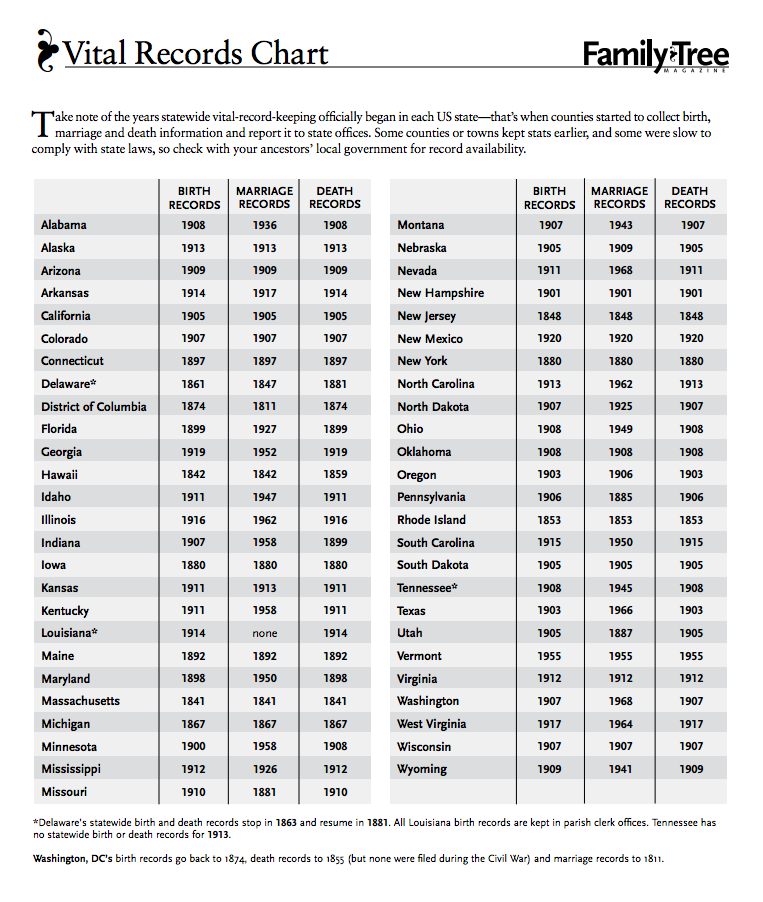
Family Tree Magazine Vital Records Chart
Vital records are records of life events kept by the authority of a government. Birth certificates, marriage licenses, and death certificates are all considered vital records, and are excellent sources of information about our ancestors' lives. Each US state has laws governing the way vital records are collected and preserved.

Family Tree Magazine recently published a handy chart listing the beginning dates for official records in all 50 US states. The differences by state can be important to understand. For example, New Jersey began keeping official birth records in 1848, but Mississippi didn't begin until 1912. Indiana didn't begin recording marriages officially until 1958. If your ancestor was born in Mississippi in 1902 and married in Indiana in 1930, you will not be able to locate either a birth certificate or a marriage certificate. If she was born in New Jersey in 1850 and married in 1868, you should be able to get copies of both. Some (but not all) vital records for 48 of the 50 states are available digitally at FamilySearch.org.

Family Tree Magazine's Vital Records chart is available for free at familytreemagazine.com. Copies are also available in the Williamsburg (VA) Family History Center.

Monday, January 14, 2013

Millions and millions of images - finding what's new

A million is a big number, but it's becoming an ordinary number in family history research.  On an almost daily basis, FamilySearch is adding millions of images and names to the Historical Record Collections already available at FamilySearch.org.  Information you have been unable to find may become available today or next week or next month! 


To see what's new, go to FamilySearch.org, scroll down and click on All Record Collections.  The list of collections will be arranged in alphabetical order. 


Men in the US born 1872-1900 - WWI Draft Cards

All men living in the US in 1917 and 1918 (aliens as well as citizens) who were born between September 1872 and September 1900 were required by law to register for the draft unless they were already serving in the military. If you ancestor was born in that timeframe, check for a draft registration card. The cards include details like current residence, date and place of birth, name and address of nearest relative, and more.

Alabama, Washington county; Roll: 1473283; Ancestry.com. U.S., World War I Draft Registration Cards, 1917-1918 [database on-line]. Provo, UT, USA: Ancestry.com Operations Inc, 2005.

Until recently, the only way to find a draft registration card was to look at every card filed (either on microfilm or at the National Archives at Atlanta) by the Draft Board in the county and state where your ancestor lived. Thanks to digitization and indexing efforts, you can now quickly search by a person's name.

Draft registration collections are available on several genealogy web sites including FamilySearch.org and Ancestry.com. More than 24 million men registered, so you are likely to find a relation among them.